HDR · Private APIs · Making it stop
The off switch for the logo that burned your eyes
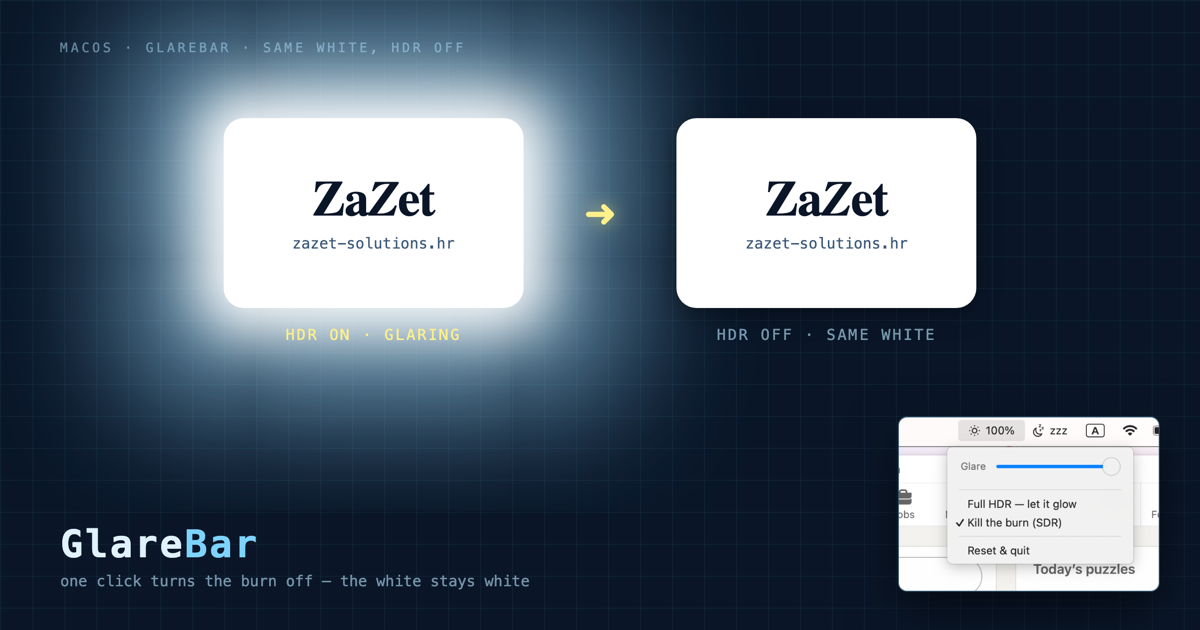
Last time I reverse-engineered the HDR trick that makes a logo burn brighter than your whole screen, and shipped a tool to reproduce it. It was a fun party trick. Then a comment stopped me: for some people that "fun" brightness isn't fun at all — it dazzles and hurts. So I spent a day going the other way, into macOS's private display APIs, and built the off switch.
The comment that flipped it
The glowing-logo post did numbers, and most of the replies were "cool, how." But one wasn't admiring the trick at all — it was about what the trick does to someone who can't filter that much light:
"Personally, this just irritates and blinds me."— Aviram Avidan, in the comments · אותי אישית זה מעצבן ומסנוור
That reframed the whole thing. A logo that "grabs your attention" by emitting more light than the UI around it is, for a light-sensitive person, a small assault you can't opt out of. The trick bets on the viewer's hardware — and some of those viewers are wincing. macOS can turn HDR off. It just makes you give something up to do it.
Why macOS makes you choose
On a Liquid Retina XDR MacBook, the burn comes from EDR headroom — extra brightness range above normal "white" that HDR content is allowed to use. You can remove it in Settings → Displays → Preset. But here's the trap I hit live:
| Preset | Kills the burn? | Brightness slider |
|---|---|---|
| Apple XDR Display (P3-1600) | No — full HDR | Works |
| Apple Display (P3-600) | Yes — no EDR headroom | Works |
| Internet & Web (sRGB) | Yes | Locked |
The obvious "safe" choice — sRGB — is a reference preset: it pins the panel to a fixed calibrated nit level and greys out the brightness slider entirely. So your choices look like "burns" or "bright and stuck." For someone who needs it dark, both are wrong.
Into the private APIs
I wanted to know what actually controls this, so I pulled the display frameworks apart. On Apple Silicon the symbols live inside the dyld shared cache, not on disk:
dyld_info -exports /System/Library/Frameworks/CoreDisplay.framework/CoreDisplay \
  | grep -iE 'HDR|Bright|Preset|Headroom'
That surfaced the whole hidden control surface — CoreDisplay_Display_SetActivePresetIndex, CoreDisplay_Display_SetHDRModeEnabled, DisplayServicesSetBrightness, GetCurrentHeadroom. I wrote tiny C probes and tested each one on my own panel. Two findings decided the design:
- Brightness works — until it doesn't.
DisplayServicesSetBrightnesshappily drove my backlight 42% → 20% on the P3-600 preset. Switch to the sRGB reference preset and the same call is pinned at 1.0 — it won't move. So the slider lock isn't a UI nicety; it's enforced deep enough that even the private API can't bypass it. - Gamma is the escape hatch. The public
CGSetDisplayTransferByFormulascales the display's transfer function directly — it dims uniformly, on any preset, and keeps going below the backlight's hardware floor. No private symbol, nothing to break on an OS update.
So the recipe wrote itself: kill the burn by switching to a non-reference non-HDR preset (P3-600, which stays adjustable), and handle "darker than macOS allows" with a gamma dim on top.
GlareBar
I packaged it the same way as AwakeBar — a ~150-line Swift menu-bar app, no dependencies, one install.sh. Two controls that map exactly to the two findings:
- Kill the burn — flips the built-in display to the non-HDR P3-600 preset. Chosen by the preset's real flags (
PresetST2084Capable,PresetUIReferencePreset), not a hard-coded index, so it's right on any machine. HDR/superwhite content can no longer out-shine the UI. - Glare slider — a software gamma dim from 100% down to 15%, taking the whole screen below its hardware minimum. This is the part macOS refuses to give you under a burn-free preset.
- Full HDR — puts the XDR preset back when you actually want the range.
It ships ad-hoc signed, launches at login, and leaves no daemon or root privileges behind. The whole thing is auditable in a couple of minutes.
Install
git clone https://github.com/tatarco/glarebar.git
cd glarebar
./install.sh    # builds, installs to ~/Applications, launch-at-login
Requires the Xcode Command Line Tools (xcode-select --install) — no Xcode, no package manager. A sun icon appears in your menu bar; click it, kill the burn, drag the glare down to whatever your eyes can take.
The two halves of the story
One post to expose the glow, one to turn it off. The first was about noticing a clever exploit of human attention — not inventing it, just pulling it apart; this one is about the person on the other end of that exploit who just wanted it to stop. Both took about a day. The tools are open source so neither of us has to spend that day again.
Get GlareBar
Open source (MIT), Swift, zero dependencies. One command:
git clone https://github.com/tatarco/glarebar.git
cd glarebar && ./install.sh