96% → 4% in 80 min · 2 tabs at 100% CPU · 14.4 h of CPU time · 50 lines of zsh
My agents leave zombies behind. Two of them drained my Mac from 96% to 4%.
I run Claude Code all day, and the agents start things in the background: a browser they drive, a dev server, a script waiting on something. When a session ends, nobody is left to stop what it started. Today two of those leftovers, both browser tabs I never looked at, ran my MacBook Pro from 96% to 4% in 80 minutes.
What happened
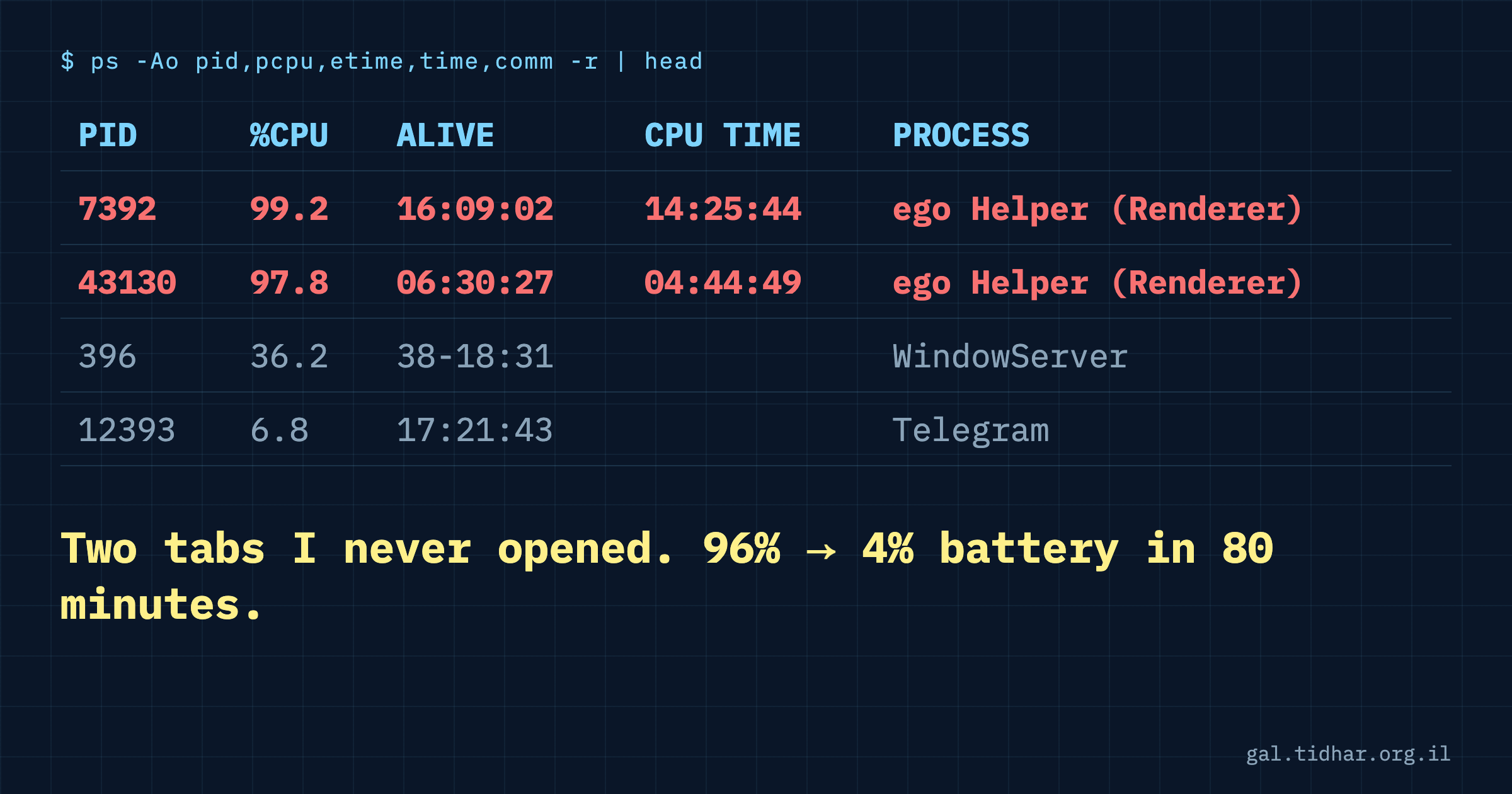
ps, sorted by CPU, at 14:25.I was on a video call, nothing special. The laptop got hot and the battery kept falling. I plugged in a 100W charger and it felt like it was barely keeping up. I asked Claude to find out what was going on.
macOS keeps a power log that most people never open: pmset -g log. It records every sleep, wake and power assertion with the battery level next to it. It showed 96% at 12:02 and 4% when I plugged in at 13:20. The call was part of the load (camera, WebRTC, audio), but it ended at 12:36, and between 12:45 and 13:20 the battery still went from 47% to 4% with no call at all. On the charger it was back to 61% when I unplugged at 14:06.
Then ps, sorted by CPU. Two renderer processes of the browser my agents drive (ego lite, built on Chromium), each at about 100%. A renderer is one tab. One had been alive 16 hours and had burned 14 hours 25 minutes of CPU time. The other, 6.5 hours alive, 4 hours 44 minutes of CPU. Neither was a tab I had opened or ever looked at.
I already had a fix for this. It missed.
Five days earlier the Mac had been hot every night. The culprit was a Python script left behind by a Claude Code session that had died: its parent was gone, so it was adopted by launchd (parent PID 1), and it had been running at 90% CPU for six and a half days.
So I built a battery reaper: a launchd job that runs every 15 minutes and kills orphaned script processes (Python, Node, Bun, Ruby, Perl, shell) that have been alive over an hour and averaged over 50% CPU. It also restarts the agent browser when it leaves a "Capturing" power assertion open for more than four hours, because those keep the display awake. It has done that five times since I built it.
Today it caught nothing. I wrote it for the last fire. A stuck tab is not an orphan: its parent, the browser, is alive and well. It is not a script either. Both of my filters said "not mine".
Why agents leave these behind
When you start a process yourself, you also remember to close it, or you see it. An agent starts things as a side effect of a task: open a page to check a layout, run a server to test a route, poll something until it changes. The task ends, the session ends, the context is gone, and whoever started the process no longer exists to stop it. You never see it because you never opened it. A tab in a browser window you don't look at is the perfect hiding place.
The test: lifetime average, not current CPU
Current CPU is noisy. A browser spikes to 100% for a few seconds all the time; killing on that would kill healthy work. What gives a zombie away is the ratio of two numbers ps already prints: how long the process has been alive (etime) and how much CPU time it has used (time). Divide one by the other and you get its average load over its whole life.
The tab that drained me: 14.4 h of CPU over 16.2 h alive, an average of about 90% across 16 hours. The second tab: 4.7 h over 6.5 h, about 73%. Nothing healthy looks like that. This lists every process alive over an hour that averaged more than 50%:
ps -axo pid=,etime=,time=,comm= | awk '
function s(t,  d,n,p,i,x){d=0; if(t~/-/){split(t,p,"-");d=p[1];t=p[2]} sub(/\..*/,"",t); n=split(t,p,":"); x=0; for(i=1;i<=n;i++)x=x*60+p[i]; return d*86400+x}
{a=s($2); c=s($3); if(a>3600 && c*100/a>50){$1=$1; printf "%3d%%  alive %5.1fh  %s\n", c*100/a, a/3600, substr($0, index($0,$4))}}' | sort -rn
On a healthy Mac it prints nothing. With the threshold at 5% the top of my list is WindowServer at 16%, which is what normal looks like.
The reaper, now with tabs
I added the same test for the agent browser's renderer processes, alive over an hour and averaging over 60%. Killing a renderer just crashes that one tab; the browser stays up, and you reload it if you needed it. Every kill goes to a log and shows a notification, so nothing disappears silently. In the orphan check, processes that launchd runs on purpose are never touched.
#!/bin/zsh
# Kills battery hogs: orphaned scripts stuck at high CPU, and stale ego screen captures.
# ponytail: thresholds are guesses; tune MIN_AGE/MIN_CPU if it kills something it shouldn't.
MIN_AGE=${MIN_AGE:-3600}   # seconds an orphan must have lived
MIN_CPU=50     # average % CPU over its lifetime
CAPTURE_MAX_H=4
LOG=~/Library/Logs/battery-reaper.log
log() { echo "$(date '+%F %T') $*" >> $LOG; }
notify() { osascript -e "display notification \"$1\" with title \"Battery reaper\"" 2>/dev/null; }

secs() { # ps time/etime [[dd-]hh:]mm:ss[.xx] -> seconds
  local t=${1%%.*} d=0
  [[ $t == *-* ]] && { d=${t%%-*}; t=${t#*-}; }
  local p=(${(s.:.)t}) s=0
  for x in $p; do s=$((s*60 + 10#$x)); done
  echo $((d*86400 + s))
}

# PIDs launchd manages on purpose (nanoclaw, idea-backlog, wa bridges...) are never touched
services=" $(launchctl list | awk 'NR>1 && $1 ~ /^[0-9]+$/ {printf "%s ", $1}') "

ps -axo pid=,ppid=,etime=,time=,comm= | while read pid ppid etime cpu comm; do
  [[ $ppid == 1 ]] || continue
  [[ ${comm:t:l} =~ '^(python|python3.*|node|bun|deno|ruby|perl|bash|zsh|sh)$' ]] || continue
  [[ $services == *" $pid "* ]] && continue
  age=$(secs $etime); used=$(secs $cpu)
  (( age > MIN_AGE && used * 100 / age > MIN_CPU )) || continue
  cmd=$(ps -o command= -p $pid)
  log "KILL orphan pid=$pid age=${age}s avgcpu=$((used*100/age))% cmd=$cmd"
  kill $pid; sleep 2; kill -0 $pid 2>/dev/null && kill -9 $pid
  notify "Killed orphan ${comm:t} (pid $pid, $((used*100/age))% CPU for $((age/3600))h)"
done

# ego lite leaves "Capturing" assertions that keep the display awake; restart ego if one is stale
stale=$(pmset -g assertions | awk -v max=$CAPTURE_MAX_H '/ego lite.*Capturing/ {match($0,/\] [0-9]+:/); h=substr($0,RSTART+2,RLENGTH-3); if (h+0 >= max) n++} END {print n+0}')
if (( stale > 0 )); then
  log "RESTART ego lite: $stale capture(s) older than ${CAPTURE_MAX_H}h"
  osascript -e 'quit app "ego lite"' 2>/dev/null; sleep 5
  pkill -x "ego lite"; for i in {1..10}; do pgrep -x "ego lite" >/dev/null || break; sleep 1; done; open -ga "ego lite"
  notify "Restarted ego lite ($stale stale screen captures)"
fi

# ego renderers (tabs) that spin at ~100% for hours; killing one just crashes that tab
ps -axo pid=,etime=,time=,comm= | grep 'ego Helper (Renderer)' | while read pid etime cpu rest; do
  age=$(secs $etime); used=$(secs $cpu)
  (( age > MIN_AGE && used * 100 / age > 60 )) || continue
  log "KILL ego renderer pid=$pid age=${age}s avgcpu=$((used*100/age))%"
  kill $pid
  notify "Killed runaway ego tab (pid $pid, $((used*100/age))% CPU for $((age/3600))h)"
done
It runs from a LaunchAgent with StartInterval 900 and RunAtLoad. The thresholds are guesses and they are at the top of the file, ready to tune.
What I would do again, and what not
- Check the lifetime average first. It found both tabs in one command.
- Read
pmset -g logbefore guessing. It has the battery level next to every event, so you can see exactly when the drain started. - Don't write the cleanup for the last incident only. Mine matched one kind of process (orphaned scripts) and the next zombie was a different kind. The test that generalises is the ratio, not the process name.
- Other things keep a Mac awake too: while digging I found a remote-desktop app that had held "disable display sleep" for about 19 hours. Not a zombie, but worth a look in
pmset -g assertions.
Check your own Mac
Run the one-liner above. If it prints anything you don't recognise, look at its parent with ps -o ppid= -p PID: a parent of 1 means whoever started it is gone.