nautivia.eu · one 3:19 screen recording · 8 issues · same evening
Three minutes of watching one real user
I have been building nautivia.eu, croatianferries.com and nautivia.app with Claude Code for weeks. A friend recorded himself trying the entrance page for three minutes and nineteen seconds, talking as he went. He found in a minute what weeks of building had not shown me, including one thing I had broken that same morning.
He stopped himself from giving opinions
The recording is in Hebrew. The first thing he said, translated:
"It took me a while to get used to it, because I look at tech sites all day. I came to leave you feedback like 'move this up here, do it like that', and then I stopped. This isn't a SaaS company."
He stopped giving opinions and just used it. That turned out to be the useful part. Opinions tell me what someone would do. A recording shows me what they did.
"It's not clear to me that each of these is pressable"
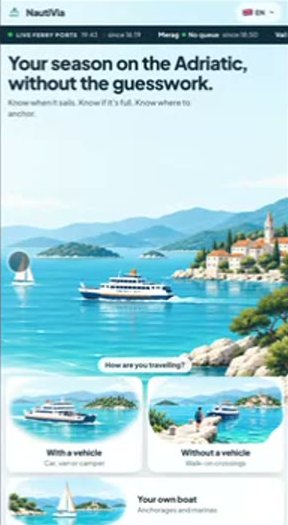
At 1:17 he said it. Three big picture cards: with a vehicle, without a vehicle, your own boat. They are the biggest thing on the screen, and the whole job of the page. To me it is obvious you press them, because I put them there and I have looked at them every day for weeks. It was the second time that day I watched someone not see it.
The fix from the morning was the confusion in the evening
That morning I had watched another first-time visitor land on the page and scroll down without pressing anything. So I asked for a second, longer copy of the same three cards below the fold, each with a full explanation, so that someone who scrolls has something to read.
In the evening my friend tapped a card at 1:33 and the page jumped "way down", straight into that copy. My fix for the first user became the second user's confusion. I had guessed what the first one needed instead of watching the next one.
The rest of the path
- The location gate. "Your own boat" opened a full screen that said only "Where are you? Use my location". He pressed Back. He tried again later and pressed Back again. "Why does it go to location first?"
- The question asked twice. "Without a vehicle" took him to the ferry site, which asked him again whether he was in a car or on foot. The answer was already in the URL (
?mode=foot). - Back loses your place. Back took him to the top of the entrance page, where he had to find the card again.
- No menu. "On mobile you usually open a menu: vehicle, without a vehicle, own boat."
"There are several clicks here that seem unnecessary."
And about the search form itself, the thing all those clicks lead to: "very clear and intuitive". The content was fine. The path to it was not.
The same evening
The video was transcribed locally with Whisper (Hebrew) and the frames reviewed. Eight issues came out, ranked:
| # | Issue | What changed |
|---|---|---|
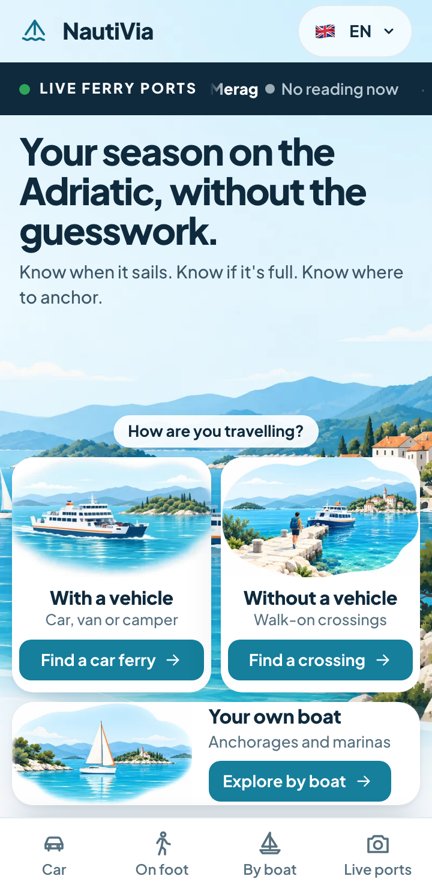
| 1 | Cards don't read as tappable | Each card is one big link with a visible button that says what it does ("Find a car ferry →") |
| 2 | The below-the-fold copy added that morning | Stripped down |
| 3 | The ferry site re-asks car or on foot | Arriving from the hub opens the search form directly |
| 4 | A floating mini search bar | - |
| 5 | The location screen as a dead end | Removed. The app opens on a real place and asks for location only when you tap |
| 6 | No mobile navigation | A bottom tab bar: Car, On foot, By boat, Live ports |
| 7 | Back loses your place | Fewer hops: the card now lands on the form |
| 8 | A tiny live ticker | - |
Three Claude Code agents worked on the three sites in parallel. Each change was checked at every phone width from 320 to 430 pixels plus tablet and desktop, and deployed the same evening. From the entrance page to the search form went from three or four taps to one.
Then my own phone
I opened the result on my phone and found three more things that every automated check had passed: a map card clipped at the top on an iPhone SE, a port (Merag) that could not be pressed, and a new location card that took half the screen. Each was fixed that night. The checks looked for exactly what I had told them to look for. So did I.
What I would tell myself on day one
- I cannot see that a card doesn't look pressable, because I know it is. Someone who has never seen the page sees it in a minute.
- Ask for a recording, not for feedback. A recording of someone trying is worth more than their advice.
- Don't fix the screen from one person and move on. Watch the next person on the fixed screen.
- Green tests are a floor. Eyes on a real phone still catch things.
Record yourself for three minutes?
If you're willing to try the site and record your screen while you talk, I would really like to see it, even if it is embarrassing for me.